Google Partner · Google Ads, SEO & AI search for healthcare practices since 2019 · US & CanadaGoogle Partner · Healthcare search


Healthcare Marketing Guides
How to Run PPC Ads for Urgent Care Clinics (Google Ads)
Running Google Ads for an urgent care clinic is not simply a matter of choosing a few keywords, writing an ad and setting a daily budget. Urgent care is a particularly competitive local search environment. When someone searches for “urgent care near me,” “walk-in clinic,” or a specific urgent care service, they are often looking for somewhere they can visit now or in the near future.
That makes Google Search a valuable channel for urgent care clinics, but only if the campaign is built around search intent, location, conversion tracking and the actual services the clinic wants to grow. I’ve worked on Google Ads campaigns for healthcare practices where the difference between generating clicks and generating new-patient opportunities came down to how those pieces were connected.
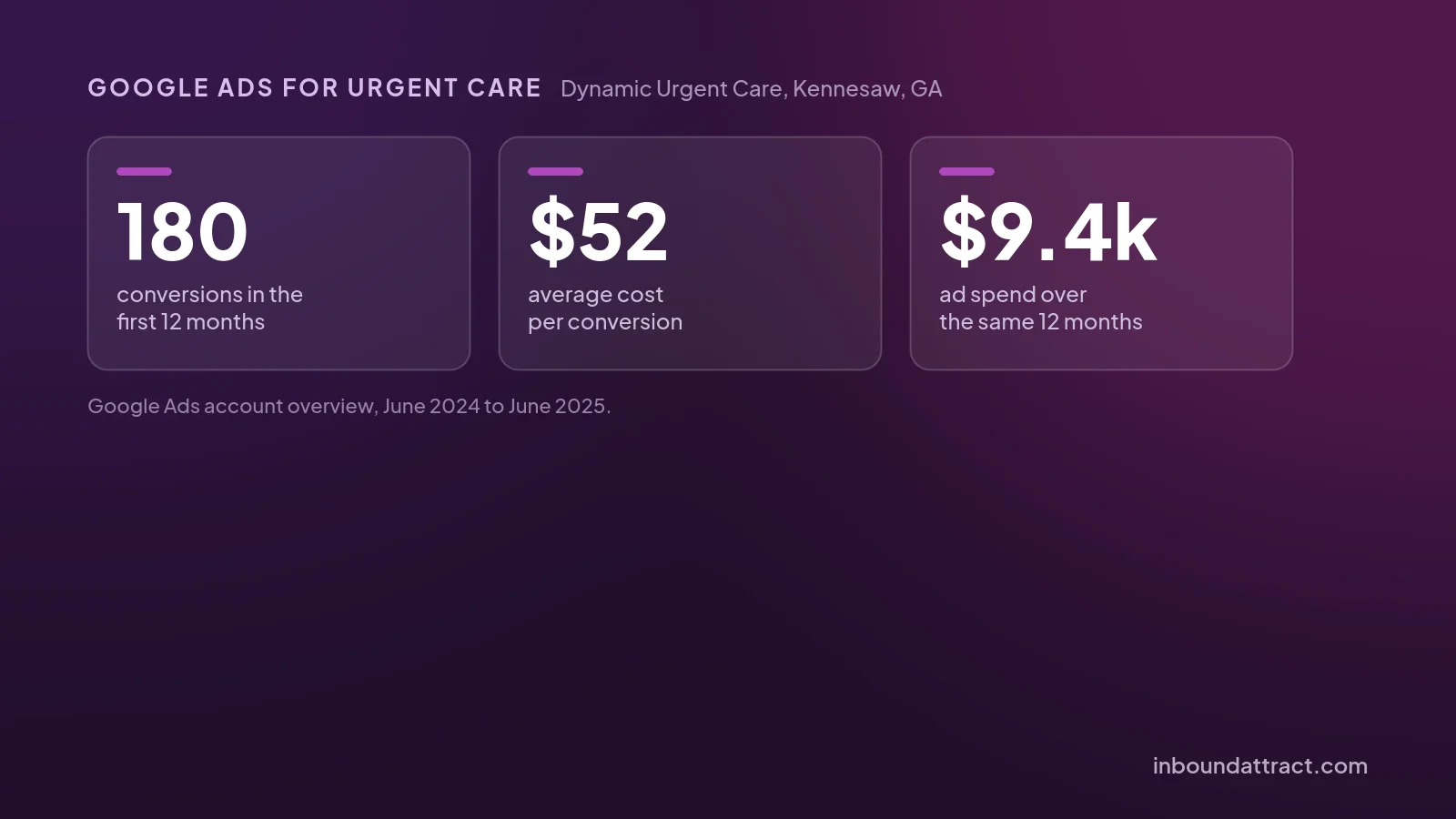
One example is Dynamic Urgent Care, an urgent care clinic in Kennesaw, Georgia, serving the 30152 area. The clinic was competing against large hospital systems that had significant visibility in local search. Rather than trying to outspend those competitors, we focused on capturing high-intent searches, improving the path from ad click to appointment and building better conversion data. The campaigns we built and ran from June to November 2024 went on to bring in 180 conversions in their first 12 months, at about $52 each, along with a consistent flow of calls and appointment requests.
Here is how I would approach Google Ads for an urgent care clinic.
In this guide
- Step 1. Start with the services you actually want more patients for
- Step 2. Separate high-intent searches from research searches
- Step 3. Don't treat location targeting as an afterthought
- Step 4. Build the landing page around the search
- Step 5. Track more than clicks
- Step 6. Track calls and forms separately
- Step 7. Write ads around the reason someone is searching
- Step 8. Don't launch Performance Max before you have the basics right
- Step 9. Use your first few weeks to collect information
- Step 10. Don't optimize purely for cost per lead
- Step 11. Use Google Business Profile alongside Google Ads
- What PPC ads for urgent care clinics cost
- A real-world example: Dynamic Urgent Care
- Frequently asked questions
In this guide
- Step 1. Start with the services you actually want more patients for
- Step 2. Separate high-intent searches from research searches
- Step 3. Don't treat location targeting as an afterthought
- Step 4. Build the landing page around the search
- Step 5. Track more than clicks
- Step 6. Track calls and forms separately
- Step 7. Write ads around the reason someone is searching
- Step 8. Don't launch Performance Max before you have the basics right
- Step 9. Use your first few weeks to collect information
- Step 10. Don't optimize purely for cost per lead
- Step 11. Use Google Business Profile alongside Google Ads
- What PPC ads for urgent care clinics cost
- A real-world example: Dynamic Urgent Care
- Frequently asked questions
Quick note from the writer

I’m Salman Mehmood, founder of Inbound Attract. I work with healthcare practices on Google Ads, SEO, and patient acquisition, and one thing I’ve learned from managing these campaigns is that getting clicks is rarely the hardest part.
The real challenge is turning those searches into actual patients.
That’s why I wrote this guide from a practical, campaign-management perspective. I’m going to show you how I would approach an urgent care Google Ads campaign: what I’d set up, what I’d track, what I’d look for once the campaign starts generating data, and where I’d make changes.
Now, let’s get into the actual setup.
Have Questions? Book A 20-min discovery call with me!
Step 1. Start with the services you actually want more patients for
Before opening Google Ads Keyword Planner, start with the business. What does the urgent care clinic actually want to fill? For many clinics, that might include:
- Urgent care visits
- Walk-in appointments
- Same-day appointments
- Pediatric urgent care
- Minor injuries
- Illness treatment
- Physicals
- COVID or flu testing, where applicable
- Occupational health services
- Sports injuries
- Other high-demand services offered by the clinic
The mistake I see frequently is building one large campaign around the word “urgent care” and expecting Google to figure out the rest. Instead, map your campaigns around commercially valuable services and search intent. For example:
Campaign: Urgent Care. Potential keyword themes:
- urgent care
- urgent care near me
- urgent care clinic
- urgent care center
- walk in clinic
- walk in clinic near me
Campaign: Specific Services. Potential keyword themes:
- urgent care for minor injuries
- pediatric urgent care
- sports injury clinic
- same day medical appointment
The exact structure will depend on the clinic’s services, location and search volume. The goal is not to build the biggest keyword list possible. It is to create a campaign structure where you can understand what people are searching for, what you are paying for and which searches are actually producing patients.
Google’s current Search campaign setup still allows advertisers to organize keywords into ad groups and use broad, phrase and exact match to influence how closely searches relate to those keywords.
Step 2. Separate high-intent searches from research searches
Not every healthcare search has the same value. Compare “urgent care near me” with “what is urgent care used for”. The first person may be actively looking for a clinic. The second person may simply be researching.
That distinction matters because your advertising budget should initially prioritize searches that are most likely to turn into an appointment, phone call or visit. For an urgent care clinic, I would generally start with searches showing clear local or service intent, such as:
- urgent care near me
- urgent care Kennesaw
- urgent care clinic Kennesaw
- walk in clinic Kennesaw
- urgent care open now
- same day urgent care
- walk in medical clinic
You should then review the actual search terms generated by the campaign rather than assuming your keyword list tells you exactly what people are searching. The Search Terms Report is particularly useful here because it shows the searches that triggered your ads and allows you to identify irrelevant searches that should be excluded. This is one of the areas where active campaign management matters.
Step 3. Don't treat location targeting as an afterthought
Local targeting is critical for urgent care. If your clinic is in Kennesaw, there is little value in paying for someone 50 miles away who is unlikely to drive to the clinic. Start by defining the actual geographic area the clinic serves. That might be:
- A city
- Several nearby cities
- Specific ZIP codes
- A radius around the clinic
- A combination of these
Then monitor where your clicks and conversions are actually coming from.
Google’s location targeting can include people physically located in an area as well as people showing interest in that location, depending on the campaign’s location settings. Advertisers can instead choose the “Presence” option when they want to focus on people who are in or regularly in the targeted locations. For a local urgent care campaign, I would pay close attention to this setting.
You should also look at the location data after launch. If one part of your service area produces significantly better patients than another, that is useful information. Your budget does not necessarily need to be distributed evenly across every location you target.
I would start with “interest” setting, and keep my eyes on conversion data in locations while having a close radius of 5 miles.
Step 4. Build the landing page around the search
One of the biggest mistakes with healthcare Google Ads is sending every click to the homepage. Someone searches “urgent care near me” and lands on a generic homepage with:
Welcome to our healthcare center.
That creates unnecessary friction. Instead, the landing page should immediately answer: Are you the right clinic for what I need?
For an urgent care landing page, I would make the following information easy to find:
Location
Clearly state the city and surrounding service area.
Services
Explain the types of urgent care needs the clinic handles.
Hours
If the clinic offers extended hours, make that obvious.
Phone number
Make calling easy, particularly on mobile.
Appointment option
If the clinic accepts appointments or online booking, make that prominent.
Directions
Make it easy for someone to find the clinic.
Trust information
Include appropriate information about the physicians, clinic, credentials, reviews and experience.
The landing page should not feel like an advertisement. It should feel like the logical next step after someone searched for care. This is exactly why landing-page optimization should be considered part of Google Ads rather than a separate project.
Step 5. Track more than clicks
If you only track clicks, you don’t really know whether Google Ads is working. For an urgent care clinic, I would want to measure actions such as:
- Calls
- Appointment requests
- Contact form submissions
- Online bookings
- Other meaningful patient inquiries
Google Ads allows advertisers to track phone conversions from ads and from phone numbers on websites. You can also set minimum call durations so that very short calls don’t automatically count as valuable leads. That distinction is important. A 12-second call asking for the clinic’s fax number is not necessarily equivalent to a five-minute call from someone trying to book a visit.
The more mature your tracking becomes, the more you can move from “How many leads did Google Ads generate?” to “How many qualified new-patient opportunities did Google Ads generate?” That’s a much more useful question.
Step 6. Track calls and forms separately
I recommend keeping your conversion actions organized. For example:
Primary conversions
- Qualified phone calls
- Appointment requests
- Completed booking
Secondary actions
- Click-to-call
- Directions
- Page engagement
- Other micro-conversions
This gives you a clearer picture of what Google is actually optimizing toward. If the clinic receives a significant percentage of new patients through phone calls, call tracking becomes especially important. Google Ads can track calls from ads, calls to numbers on the website and, where appropriate, imported call conversions from another tracking system. The ultimate goal is to connect the advertising click to the patient acquisition outcome.
Step 7. Write ads around the reason someone is searching
Your ad does not need to sound clever. It needs to be relevant.
If someone searches for urgent care Kennesaw, the ad should immediately communicate that the clinic provides urgent care in Kennesaw. If they search for walk in clinic near me, the messaging should make it clear that the clinic accepts walk-in patients, if that is actually the case.
Good urgent care ad messaging may include things such as:
- Local urgent care clinic
- Walk-In Care Available
- Convenient Local Location
- Same-Day Care
- Extended Hours
- Book an Appointment
- Call the Clinic
Only use claims that are accurate for the clinic. The strongest ads usually connect the search intent with a clear next step.
Step 8. Don't launch Performance Max before you have the basics right
Performance Max can be useful for healthcare lead generation, but I wouldn’t automatically make it the first campaign I launch for an urgent care clinic. I generally prefer to establish a strong Search campaign first. Why? Because Search gives you a clearer view of the high-intent searches generating demand. You can learn:
- Which services generate interest
- Which search terms generate leads
- Which locations perform
- Which landing pages convert
- Which calls are valuable
- Which searches should be excluded
Once you have meaningful conversion data, Performance Max can become a useful expansion layer. Google describes Performance Max as a goal-based campaign that can access inventory across Search, Maps, YouTube, Display, Discover and Gmail, and positions it as a complement to keyword-based Search campaigns.
The important part is the conversion goal. Performance Max is heavily dependent on the signals you give it. Google’s own guidance emphasizes using strong conversion tracking and feeding the system meaningful conversion data. In other words: Don’t give Google a pile of bad conversions and expect automation to magically find good patients.
Step 9. Use your first few weeks to collect information
The first phase of a campaign should not be viewed purely as a pass/fail test. You’re collecting information. Look at:
Search terms
What are people actually searching?
Conversion data
Which searches generate calls, forms or appointments?
Location
Where are your best patients coming from?
Time of day
When are people searching and when are calls coming in?
Device
Are mobile users converting differently from desktop users?
Landing pages
Where do people convert and where do they leave?
Lead quality
Are these actually new-patient opportunities?
This is where campaign management becomes much more than changing bids. You’re building a picture of how patients are finding the clinic.
Step 10. Don't optimize purely for cost per lead
A $20 lead isn’t necessarily better than a $50 lead. Suppose Campaign A generates 20 leads at $20 each. Campaign B generates 10 leads at $50 each. At first glance, Campaign A looks better. But what if:
- Campaign A produces 2 actual patients
- Campaign B produces 7 actual patients
The second campaign is considerably more valuable. This is why healthcare advertising should eventually move beyond CPL. Look at:
Cost per lead → Cost per qualified lead → Cost per new patient → Patient value
The more accurately you can connect those stages, the better your decisions become. Google also supports conversion values, which can help advertisers distinguish between conversions based on business value rather than treating every conversion as identical.
Step 11. Use Google Business Profile alongside Google Ads
Paid search shouldn’t exist in isolation from local SEO. When someone searches urgent care near me, they may encounter a combination of:
- Paid search ads
- Map results
- Organic results
- Local business listings
Your Google Business Profile therefore matters. Make sure the profile has:
- Correct address
- Correct phone number
- Accurate hours
- Relevant services
- Current photos
- Appropriate business information
- Consistent website information
- Genuine patient reviews
For Dynamic Urgent Care, we worked on the paid campaign and Google Business Profile at the same time. The objective was not simply to buy more clicks. It was to strengthen the clinic’s overall local visibility while capturing immediate demand through Google Ads.
What PPC ads for urgent care clinics cost
There are two numbers to think about: what you spend each month, and what each lead costs you.
Most single-location clinics we work with spend between $1,000 and $3,000 a month on Google Ads. A smaller budget can still work if you keep it on high-intent searches. Dynamic Urgent Care spent about $9,400 in the first 12 months of the campaigns we built, which is under $800 a month.
For cost per lead, LocaliQ’s benchmark for emergency medicine is about $42. Dynamic’s was about $52. It’s higher than the median because large hospital systems bid on the same local searches around Kennesaw.
What pushes your cost up or down:
- How many hospitals and chains are bidding in your area
- How tightly you target your location (Step 3)
- Whether each ad goes to a page built for that search (Step 4)
- Whether you count real calls and bookings, or just clicks (Steps 5 and 6)
Our breakdown of Google Ads cost per lead by specialty has the full benchmarks.
A real-world example: Dynamic Urgent Care
This is where the strategy becomes more useful than a generic Google Ads checklist. Dynamic Urgent Care is an urgent care clinic in Kennesaw, Georgia, around 40 minutes from Atlanta.
When we started working with the clinic in mid-2024, the challenge wasn’t simply “get more traffic.” The clinic was competing against large hospital systems that already dominated the search results and advertising space in the 30152 area. The strategy was built around four pieces:
1. Search Ads. We launched high-intent Search campaigns around urgent care and walk-in clinic searches.
2. Performance Max. Once sufficient conversion data had been collected, we introduced Performance Max to expand the campaign’s reach.
3. Landing Page Funnel. Rather than relying on a generic website experience, we created a dedicated landing page funnel covering the clinic’s urgent care services and designed it around both calls and appointment form submissions.
4. Google Business Profile. We simultaneously worked on the clinic’s Google Business Profile to strengthen local visibility.
The result? We managed the account from June to November 2024. The campaigns we set up brought in 180 conversions in their first 12 months at about $52 each, and the clinic got a consistent stream of calls and appointment requests.
More importantly, the campaign helped Dynamic Urgent Care compete against much larger healthcare organizations without simply trying to match their advertising budgets.
Read Full Case Study
Dynamic Urgent Care
Urgent Care Clinic
Have Questions? Book A 20-min discovery call with me!
Frequently asked questions
Do PPC ads work for urgent care clinics?
They can, because many people searching “urgent care near me” want to be seen today. The campaigns we built for Dynamic Urgent Care in Kennesaw, Georgia brought in 180 conversions at about $52 each in their first 12 months, while competing with hospital systems.
How much does Google Ads cost for an urgent care clinic?
Most single-location clinics we work with spend $1,000 to $3,000 a month, and Dynamic Urgent Care paid about $52 per lead. The cost section above explains what moves those numbers, and our breakdown of Google Ads cost per lead by specialty has the full benchmarks.
What's the best way to advertise an urgent care clinic?
Start with Google Search ads on high-intent local searches, send each ad to a page about that service, and track calls. Keep your Google Business Profile complete at the same time, since many patients pick a clinic from the map. Add Performance Max only once you have conversion data.
How quickly do urgent care Google Ads start working?
Faster than most marketing. Dynamic Urgent Care got its first calls on the day the campaigns went live. The first few weeks then show you which searches and services bring in patients, so you can move budget toward them.
Should an urgent care clinic hire a Google Ads management agency?
It helps if nobody on your team has time to check search terms, budgets and call tracking every week. Ask any agency how they'll track calls and what they'd change in the first month. We work month-to-month, so you can judge our Google Ads management on results.

Founder, Inbound Attract. Helping clinics in the US and Canada get new patients from Google Ads, SEO and AI search since 2019. About Salman · LinkedIn
Request a Consultation
LIMITED APPOINTMENTS AVAILABLE